


Windfinder: Wind & Weather map
4.61.21K Reviews
App Specs
- Version
- 3.41.1
- Updated On
- License
- Free
- Downloads
- 5,000,000+
- Developer
- Windfinder
- Categories
- Weather
- Platform
- Android, iOS
Screenshots
 Analysis by AppCompare
On a shared phone or tablet, weather decisions often affect more than one person: someone checks whether it is a good time to cycle, another is planning a trip to the coast, and someone else just wants to know if a jacket is worth carrying. I find Windfinder: Wind & Weather map most useful when the question is not simply “Will it rain?” but whether wind and changing conditions make an outdoor plan sensible. Its focus makes it a practical companion for households with sailors, beachgoers, or anyone who spends time outside.
Useful when plans involve wind, not just rain
A standard weather app is usually quicker for a glance at the day’s general outlook. Windfinder earns its place when wind direction, speed, waves, or tides can change the plan. I would use it to compare possible windows for a sailing outing, check conditions before taking a board to the shore, or decide whether an exposed walking route is likely to feel uncomfortable. That extra detail is valuable, but it also means the app can feel more involved than a basic forecast if all I need is a quick answer about an umbrella.
A realistic household routine might be to check the forecast the evening before a weekend outing, then look again in the morning before packing. One person can focus on whether the wind suits the activity; another can use the broader weather picture to think about clothing and timing. I would treat the forecast as a planning aid, not a promise: conditions can change, and an app cannot replace local judgement or safety guidance for a serious trip.
Shared use without assuming shared preferences
Windfinder is the kind of app people can consult together on one device, but each person may care about a different part of the forecast. A sailor may pay close attention to wind direction, while a family member planning a beach visit may care more about rain and waves. Rather than scrolling through every layer as a group, it helps to agree on the actual decision first—whether to go, when to leave, or what to bring—and then check the relevant information.
I would also keep in mind that a shared screen does not make every forecast equally meaningful to everyone. Someone who knows local sailing conditions may interpret wind information differently from a casual visitor. If two people reach different conclusions, comparing the specific location and time they checked can be more helpful than arguing over a single headline forecast.
Setup, boundaries, and age context
The app is free to download, with optional in-app purchases priced from $0.99 to $12.99 per item. That is worth bearing in mind if several people use the same device: a free starting point does not mean every optional purchase is included. I would check the purchase details on the device before approving one, especially if a child or guest might tap through the app. I would not assume that a purchase, preference, or saved choice is shared or separated in a particular way; the safe approach is to review the app directly on the device you plan to use.
Windfinder is rated for Everyone, and its weather subject is suitable for a broad range of ages. Still, a child looking at wind or wave information should not be asked to make a safety decision alone. I see it as a useful way to involve younger family members in planning—such as talking about why a windy beach day might call for a different plan—while an adult remains responsible for checking conditions and making the final call.
Worth Reading Before You Choose

Baby Panda World Brings Quick Play to Modern Phones, but Its Game Library Feels Busy

ESPN’s Live Game View Makes Following Close Games Easier

QuizzLand Review: A Good Fit for Short Trivia Breaks, Not Every Player

Basketball Stars: Multiplayer Is Fast, but Can It Recover When Matches Go Wrong?

WEBTOON Turns Phone Updates Into a Better Reading Routine

Link to Windows Runs on Shared Habits, Not Social Feeds
For coordination, I would use the app to give everyone a shared reference point rather than expecting it to coordinate the outing by itself. Check the same place and forecast period, then communicate the decision through whatever method your household already uses. This is particularly helpful when the choice is between leaving early and waiting for a better window: the forecast can inform the discussion, while each person’s schedule and comfort still matter.
First Impressions: Setting Sail with Windfinder
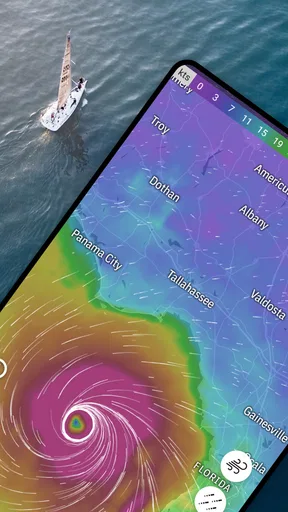
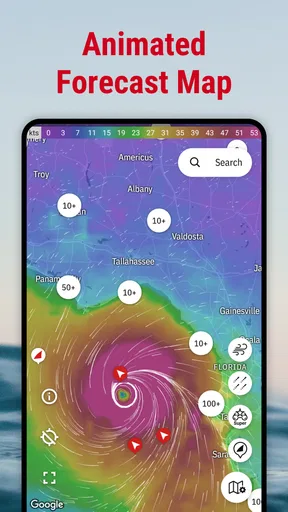
When I first launched the Windfinder: Wind & Weather map, the interface greeted me with a clean, intuitive design. It's like meeting a friendly guide who knows his way around the weather. The homepage is straightforward, showing a world map with a plethora of icons. I was immediately drawn to the vibrant wind patterns flowing across the map—it's oddly mesmerizing!
Features that Blow You Away
Now, what sets Windfinder apart? For starters, it's packed with features that cater to a wide array of outdoor enthusiasts. Whether you're into kitesurfing, sailing, or paragliding, this app has got your back.
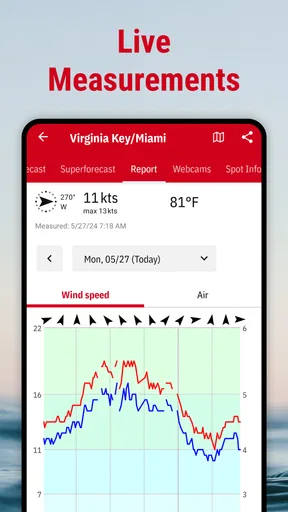
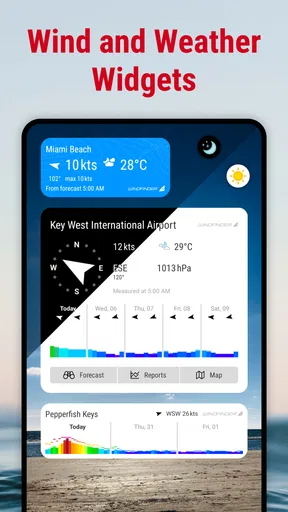
- Real-time Weather Data: The app provides real-time updates on wind speed, direction, and weather conditions. It's like having a live feed of Mother Nature's mood swings.
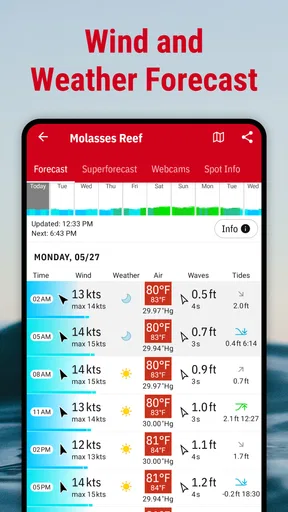
- Forecasts Galore: You get access to 10-day forecasts, which are essential for planning any outdoor activity. I found the hourly forecast particularly useful for making precise plans.
- Customizable Weather Maps: You can toggle between different layers like wind, temperature, and rainfall. It’s like having a mini weather station at your fingertips.
One feature that really caught my eye was the "Superforecast". It offers high-resolution weather data that's updated every hour. If you're serious about your weather, this is your go-to feature.
Using Windfinder: My Personal Experience
Once I got the hang of the app, I decided to put it to the test. A weekend sailing trip was on the cards, and Windfinder became my trusty sidekick. The app’s precise wind forecasts helped me choose the perfect time to set sail. And guess what? We had smooth sailing all the way!
Another time, I used it while planning a hiking trip. The detailed temperature and precipitation forecasts were spot-on, saving us from a potential downpour. It’s like having a crystal ball, but for weather.
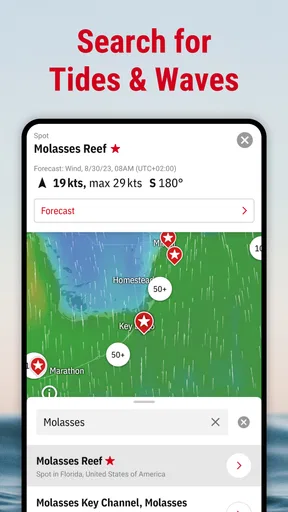
For a more deliberate workflow, I would first settle on the location, then compare the forecast at the time I expect to be outdoors rather than relying on the day’s broad summary. The map is useful for spotting how conditions vary around an area, but a regional pattern is not the same as a guarantee for one beach, trail, or launch point. When the plan depends on a narrow weather window, checking again close to departure is a sensible habit.
Who Will Love This App?
If you’re someone who loves outdoor adventures, this app is practically made for you. From surfers catching the perfect wave to hikers avoiding unexpected showers, Windfinder has something for everyone. It’s also a fantastic tool for professional sailors and pilots who need precise weather data.
Even if you're just someone who likes to keep an eye on the weather, it’s a fun and informative app that can enhance your daily routine. Just think of all the weather talk you can impress your friends with!
I would be more cautious about recommending it as the only weather app for someone who mainly wants a simple commute forecast, a quick glance at local rain, or a straightforward notification. A general-purpose weather app may be faster for those everyday checks. Windfinder’s specialist angle is a strength when wind and water conditions matter, but it can be unnecessary detail when the decision is simply whether to walk to the shop.
What to expect from a specialist forecast
Compared with the usual weather alternatives, Windfinder is less about presenting a broad daily snapshot and more about giving outdoor users information they can apply to a particular activity. That distinction is useful, but it calls for a little interpretation. I would not read one favorable wind indicator as an automatic “go”: the route, exposure, experience level, and the rest of the weather all affect whether an outing is appropriate.
A practical tip is to avoid making a decision from a single map view. Check the forecast for the intended place and time, use the relevant layers rather than switching through everything, and revisit the outlook if the outing is important. This makes the app easier to use and reduces the temptation to treat a colorful map as more precise than it is. For safety-critical choices, I would also consult suitable local advice instead of relying on an app alone.
The app comes from Windfinder and has been available since June 15, 2010. Its current version is 3.38.5, and it requires Android 7.0 or later. It has a 4.7 average from around 92,000 ratings, with over 5 million installs. Those figures suggest it has found a substantial audience, particularly among people who want more than a basic weather glance, but popularity does not remove the need to judge whether its specialist focus matches your routine.
Wrapping it Up: Is Windfinder Worth Your Time?
After spending some quality time with Windfinder: Wind & Weather map, I can confidently say it’s a top-notch app for anyone who needs reliable weather information. The user-friendly design, combined with comprehensive features, makes it a must-have tool for weather enthusiasts.
So, next time you're planning an outdoor adventure or just curious about the weather, give Windfinder a try. It might just become your new favorite app. Happy weather watching!
My household verdict is that it works best when at least one person has a clear reason to check wind, waves, or tides, and everyone understands that the forecast supports the decision rather than making it. It can help a group settle on a time, compare a couple of outdoor options, and pack with a better sense of conditions. If your family mostly needs a simple daily forecast, a less specialized alternative may be easier; if water or wind shapes your plans, Windfinder is a thoughtful tool to keep in the routine.
Pros
- Accurate wind forecasts globally.
- User-friendly interface and design.
- Customizable notifications.
- Detailed weather maps accessible.
- Offline mode for saved locations.
Cons
- Limited free features.
- Ads on free version can be intrusive.
- No radar for storm tracking.
- Some data requires premium.
- Occasional loading delays.
FAQs for Windfinder: Wind & Weather map
What features does Windfinder offer for weather forecasting?
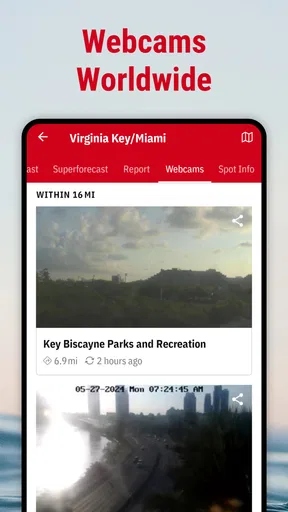
Windfinder provides detailed wind forecasts, weather maps, and live data for thousands of locations worldwide. Users can access 10-day forecasts, wind speed, wind direction, wave height, and tide information. The app also includes a wind alert feature, which notifies users when specific wind conditions are met, making it ideal for surfers, sailors, and outdoor enthusiasts.
Is Windfinder available for both Android and iOS devices?
Yes, Windfinder is available for both Android and iOS devices. Users can download the app from the Google Play Store for Android devices and the Apple App Store for iOS devices. It offers a consistent user experience across both platforms, ensuring that all features are accessible regardless of the device used.
Does Windfinder require an internet connection to function?
Windfinder requires an internet connection to download the latest weather data and forecasts. While some data can be cached for offline use, an active connection ensures that users receive the most up-to-date information. For accurate and reliable forecasts, it's recommended to access the app with a stable internet connection.
Are there any in-app purchases or subscriptions in Windfinder?
Windfinder offers a free version with essential features. However, for advanced features such as the removal of ads, detailed wind maps, and additional weather models, users can opt for a paid subscription called Windfinder Plus. This subscription enhances the overall experience and provides more precise data for professional use.
How accurate are the forecasts provided by Windfinder?
Windfinder is known for its accuracy in weather forecasting, especially regarding wind conditions. The app uses data from reliable weather models and updates frequently to ensure precision. While forecasts are generally accurate, users should be aware that weather conditions can change rapidly, and it's always wise to monitor updates regularly.


